
Cyber Monday Special Limited Time 70% Discount Offer - Ends in 0d 00h 00m 00s - Coupon code = getmirror

Pass the Google Cloud Certified Security-Operations-Engineer Questions and answers with ExamsMirror

Practice at least 50% of the questions to maximize your chances of passing.
Exam Security-Operations-Engineer Premium Access

View all detail and faqs for the Security-Operations-Engineer exam


523 Students Passed

95% Average Score

98% Same Questions
Viewing page 1 out of 2 pages
Viewing questions 1-10 out of questions
Questions # 1:

You are implementing Google Security Operations (SecOps) with multiple log sources. You want to closely monitor the health of the ingestion pipeline's forwarders and collection agents, and detect silent sources within five minutes. What should you do?

Options:

A.

Create an ingestion notification for health metrics in Cloud Monitoring based on the total ingested log count for each collector_id.

B.

Create a notification in Cloud Monitoring using a metric-absence condition based on sample policy for each collector_id.

C.

Create a Looker dashboard that queries the BigQuery ingestion metrics schema for each log_type and collector_id.

D.

Create a Google SecOps dashboard that shows the ingestion metrics for each iog_cype and collector_id.

Questions # 2:

You are a SOC manager at an organization that recently implemented Google Security Operations (SecOps). You need to monitor your organization's data ingestion health in Google SecOps. Data is ingested with Bindplane collection agents. You want to configure the following:

• Receive a notification when data sources go silent within 15 minutes.

• Visualize ingestion throughput and parsing errors.

What should you do?

Options:

A.

Configure automated scheduled delivery of an ingestion health report in the Data Ingestion and Health dashboard. Monitor and visualize data ingestion metrics in this dashboard.

B.

Configure silent source alerts based on rule detections for anomalous data ingestion activity in Risk Analytics. Monitor and visualize the alert metrics in the Risk Analytics dashboard.

C.

Configure notifications in Cloud Monitoring when ingestion sources become silent in Bindplane. Monitor and visualize Google SecOps data ingestion metrics using Bindplane Observability Pipeline (OP).

D.

Configure silent source notifications for Google SecOps collection agents in Cloud Monitoring. Create a Cloud Monitoring dashboard to visualize data ingestion metrics.

Questions # 3:

You are implementing Google Security Operations (SecOps) for your organization. Your organization has their own threat intelligence feed that has been ingested to Google SecOps by using a native integration with a Malware Information Sharing Platform (MISP). You are working on the following detection rule to leverage the command and control (C2) indicators that were ingested into the entity graph.
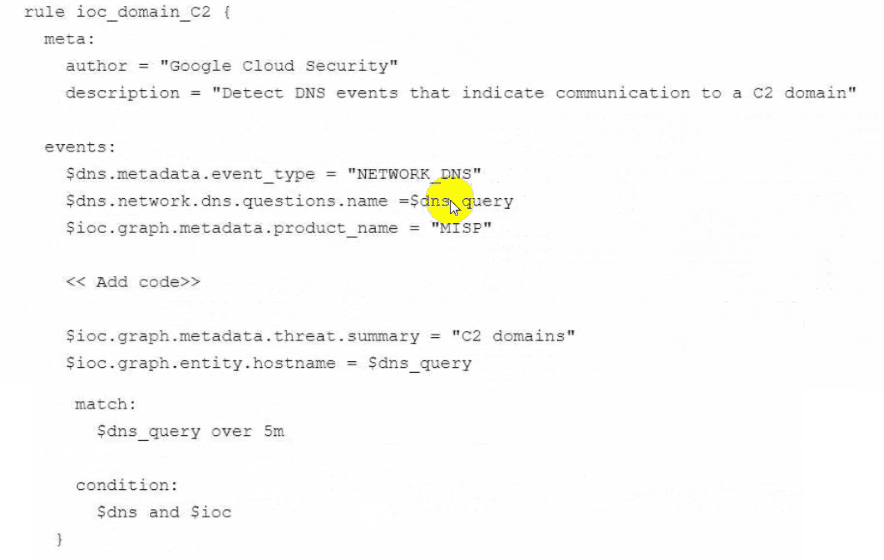
Question # 3

What code should you add in the detection rule to filter for the domain IOCS?

Options:

A.

$ioc.graph.metadata.entity_type = MDOMAlN_NAME"

$ioc.graph.metadata.scurce_type = "ElfelTYj^ONTEXT"

B.

$ioc.graph.metadata.entity_type = "DOMAlN_NAME"

Sioc.graph.metadata.source_type = "GLOBAL_CONTEXT"

C.

$ioc.graph.metadata.entity_type = "D0MAIN_NAME"

$ioc.graph.metadata.source_type = MDERIVED_CONTEXT"

D.

$ioc.graph.metadata.entity_type = ,'D0MAIN_NAME*'

$ioc.graph.metadata.source type = "source type unspecified"

Questions # 4:

Your organization uses Google Security Operations (SecOps) for security analysis and investigation. Your organization has decided that all security cases related to Data Loss Prevention (DLP) events must be categorized with a defined root cause specific to one of five DLP event types when the case is closed in Google SecOps. How should you achieve this?

Options:

A.

Customize the Case Name format to include the DLP event type.

B.

Create case tags in Google SecOps SOAR where each tag contains a unique definition of each of the five DLP event types, and have analysts assign them to cases manually.

C.

Customize the Close Case dialog and add the five DLP event types as root cause options.

D.

Create a Google SecOps SOAR playbook that automatically assigns case tags where each tag contains the unique definition of one of the five DLP event types.

Questions # 5:

Your organization uses the curated detection rule set in Google Security Operations (SecOps) for high priority network indicators. You are finding a vast number of false positives coming from your on-premises proxy servers. You need to reduce the number of alerts. What should you do?

Options:

A.

Configure a rule exclusion for the target.ip field.

B.

Configure a rule exclusion for the principal.ip field.

C.

Configure a rule exclusion for the network.asset.ip field.

D.

Configure a rule exclusion for the target.domain field.

Questions # 6:

You work for an organization that operates an ecommerce platform. You have identified a remote shell on your company's web host. The existing incident response playbook is outdated and lacks specific procedures for handling this attack. You want to create a new, functional playbook that can be deployed as soon as possible by junior analysts. You plan to use available tools in Google Security Operations (SecOps) to streamline the playbook creation process. What should you do?

Options:

A.

Use Gemini to generate a playbook based on a template from a standard incident response plan, and implement automated scripts to filter network traffic based on known malicious IP addresses.

B.

Add instruction actions to the existing incident response playbook that include updated procedures with steps that should be completed. Have a senior analyst build out the playbook to include those new procedures.

C.

Use the playbook creation feature in Gemini, and enter details about the intended objectives. Add the necessary customizations for your environment, and test the generated playbook against a simulated remote shell alert.

D.

Create a new custom playbook based on industry best practices, and work with an offensive security team to test the playbook against a simulated remote shell alert.

Questions # 7:

You have identified a common malware variant on a potentially infected computer. You need to find reliable IoCs and malware behaviors as quickly as possible to confirm whether the computer is infected and search for signs of infection on other computers. What should you do?

Options:

A.

Search for the malware hash in Google Threat Intelligence, and review the results.

B.

Run a Google Web Search for the malware hash, and review the results.

C.

Create a Compute Engine VM, and perform dynamic and static malware analysis.

D.

Perform a UDM search for the file checksum in Google Security Operations (SecOps). Review activities that are associated with, or attributed to, the malware.

Questions # 8:

You scheduled a Google Security Operations (SecOps) report to export results to a BigQuery dataset in your Google Cloud project. The report executes successfully in Google SecOps, but no data appears in the dataset. You confirmed that the dataset exists. How should you address this export failure?

Options:

A.

Grant the Google SecOps service account the roles/iam.serviceAccountUser IAM role to itself.

B.

Set a retention period for the BigQuery export.

C.

Grant the user account that scheduled the report the roles/bigquery.dataEditor IAM role on the project.

D.

Grant the Google SecOps service account the roles/bigquery.dataEditor IAM role on the dataset.

Questions # 9:

You were recently hired as a SOC manager at an organization with an existing Google Security Operations (SecOps) implementation. You need to understand the current performance by calculating the mean time to respond or remediate (MTTR) for your cases. What should you do?

Options:

A.

Create a multi-event detection rule to calculate the response metrics in the outcome section based on the entity graph. Create a dashboard based on these metrics.

B.

Use the playbooks' case stages to capture metrics for each stage change. Create a dashboard based on these metrics.

C.

Create a playbook block that can be reused in all alert playbooks to write timestamps in the case wall after each change to the case. Write a job to calculate the case metrics.

D.

Create a Looker dashboard that displays case handling times by analyst, case priority, and environment using SecOps SOAR data.

Questions # 10:

You are conducting proactive threat hunting in your company's Google Cloud environment. You suspect that an attacker compromised a developer's credentials and is attempting to move laterally from a development Google Kubernetes Engine (GKE) cluster to critical production systems. You need to identify IoCs and prioritize investigative actions by using Google Cloud's security tools before analyzing raw logs in detail. What should you do next?

Options:

A.

In the Security Command Center (SCC) console, apply filters for the cluster and analyze the resulting aggregated findings' timeline and details for IoCs. Examine the attack path simulations associated with attack exposure scores to prioritize subsequent actions.

B.

Review threat intelligence feeds within Google Security Operations (SecOps), and enrich any anomalies with context on known IoCs, attacker tactics, techniques, and procedures (TTPs), and campaigns.

C.

Investigate Virtual Machine (VM) Threat Detection findings in Security Command Center (SCC). Filter for VM Threat Detection findings to target the Compute Engine instances that serve as the nodes for the cluster, and look for malware or rootkits on the nodes.

D.

Create a Google SecOps SOAR playbook that automatically isolates any GKE resources exhibiting unusual network connections to production environments and triggers an alert to the incident response team.

Viewing page 1 out of 2 pages
Viewing questions 1-10 out of questions
TOP CODES

TOP CODES

Top selling exam codes in the certification world, popular, in demand and updated to help you pass on the first try.