Spring Special Limited Time 70% Discount Offer - Ends in 0d 00h 00m 00s - Coupon code = getmirror

Pass the Microsoft Certified: AI Business Professional AB-730 Questions and answers with ExamsMirror

Practice at least 50% of the questions to maximize your chances of passing.
Exam AB-730 Premium Access

View all detail and faqs for the AB-730 exam


366 Students Passed

86% Average Score

97% Same Questions
Viewing page 1 out of 2 pages
Viewing questions 1-10 out of questions
Questions # 1:

You create a Microsoft 365 Copilot notebook and add a file named Process.docx from a local folder. Yesterday, you updated Process.docx in the local folder. What will occur when you chat in the notebook?

Options:

A.

The chat will reference both versions of Process.docx.

B.

The chat will reference the most recent version of Process.docx.

C.

The chat will reference only the original version of Process.docx.

Questions # 2:

You attend many Microsoft Teams meetings.

You want to ensure that you can catch up on key points and next steps after each meeting.

Which Microsoft 365 Copilot feature should you use after the meetings?

Options:

A.

Recap

B.

Meeting Whiteboard

C.

Meeting info

D.

Thread summaries

Questions # 3:

You are a medical researcher.

You need to ensure that Microsoft 365 Copilot responds to you in a professional manner that is appropriate to your field. What is the best approach to achieve the goal?

Options:

A.

In the conversation, attach an example to your prompts.

B.

From Settings, configure Custom instructions.

C.

In the conversation, create a sample prompt and save it to the Copilot Prompt Gallery.

D.

From Settings, configure Copilot Memory.

Questions # 4:

You plan to use a notebook in Microsoft 365 Copilot.

What is the purpose of a notebook?

Options:

A.

to create a transcript of a conversation that you can easily email to other users

B.

to provide a private location that can be used to organize reference materials across related conversations

C.

to generate a summary of all the interactions you had with Copilot during a specific conversation

Questions # 5:

You receive the following response to a prompt: "Sorry, it looks like I can't respond to this. Let's try a different topic."

What is a possible cause of the response?

Options:

A.

The prompt is too vague to elicit a response.

B.

The prompt contains language that violates safety guidelines.

C.

The prompt contains more than five requests.

D.

The prompt is larger than the allowed context window.

Questions # 6:

For each of the following statements, select Yes if the statement is true. Otherwise, select No. NOTE: Each correct selection is worth one point.
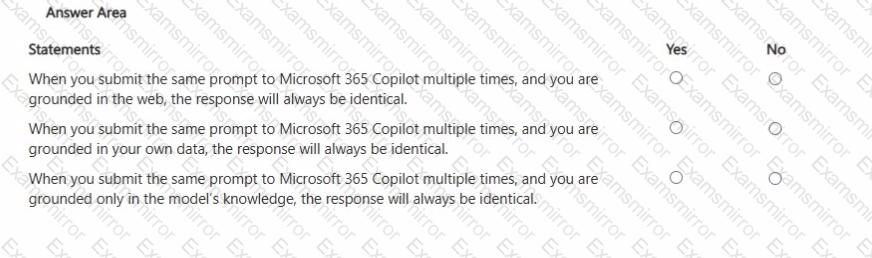
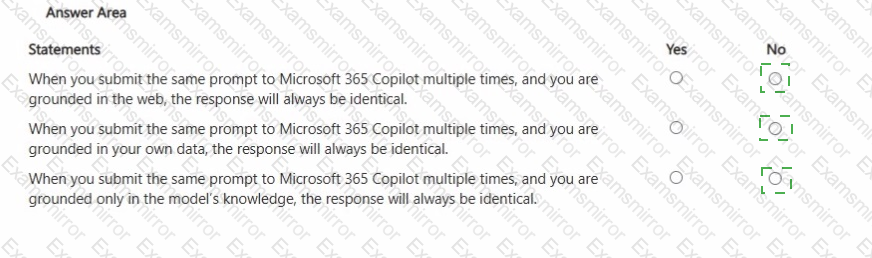
Question # 6

Options:

Questions # 7:

Select the answer that correctly completes the sentence.

Question # 7

Options:

Questions # 8:

You use Microsoft 365 Copilot.

You need to delete all your conversations by using the least amount of effort.

What is the best approach to achieve the goal? More than one answer choice may achieve the goal. Select the BEST answer.

Options:

A.

the Microsoft 365 Copilot web app

B.

the My Account portal in Microsoft 365

C.

the Microsoft 365 Copilot desktop app

D.

the Settings app in Windows 11

Questions # 9:

You use Microsoft 365 Copilot.

You regularly upload the same five files to Copilot chats.

You need to simplify referencing the files in the chats.

What are two ways to achieve the goal?

Options:

A.

Send a prompt that includes the files, and then save the prompt.

B.

Create a notebook that references the files.

C.

Ask the data engineers to create a fine-tuned model.

D.

Create an agent that has a knowledge source.

E.

Zip the documents and upload the ZIP file to the chats.

Questions # 10:

You join an internal Microsoft Teams meeting late and want to catch up on what you missed. The meeting is being recorded. You need to summarize the portion of the meeting that you missed as soon as possible.

What is the best approach to achieve the goal? More than one answer choice may achieve the goal. Select the BEST answer.

Options:

A.

From the Teams app, ask Copilot in Teams to summarize what you missed so far.

B.

From the meeting, read the transcript.

C.

From the Microsoft 365 Copilot app, ask Copilot to tell you what you missed.

D.

From the Teams app, view the intelligent recap.

Viewing page 1 out of 2 pages
Viewing questions 1-10 out of questions
TOP CODES

TOP CODES

Top selling exam codes in the certification world, popular, in demand and updated to help you pass on the first try.