
Weekend Sale Special Limited Time 75% Discount Offer - Ends in 0d 00h 00m 00s - Coupon code = drift75
Pass the Workday Payroll, Absence, and Time Tracking Workday-Pro-Time-Tracking Questions and answers with ExamsMirror
Exam Workday-Pro-Time-Tracking Premium Access
View all detail and faqs for the Workday-Pro-Time-Tracking exam
391 Students Passed
85% Average Score
91% Same Questions
Refer to the following scenario to answer the question below.
You are reviewing time for a worker in California. The worker has reported hours for the seventh consecutive day and the hours are calculating as configured. This week the worker reported 11 hours on the seventh consecutive day worked. This worker is eligible for double time on all hours worked over 8 on the seventh consecutive day; however, all 11 hours are tagged as seventh consecutive day hours.
While reviewing the Seventh Consecutive Day Double Time calculation, you notice there are two time calculation tags sharing the same row in the grid.
What does this signify?
Refer to the following scenario to answer the question below.
You are reviewing time for a worker. The worker has reported hours for the seventh consecutive day and the hours are calculating as configured. This week, the worker reported 11 hours on the seventh consecutive day worked. This worker is eligible for double-time on all hours worked over 8 hours on the seventh consecutive day; however, all 11 hours are tagged as seventh consecutive day hours.
To solve this issue, you determine that the worker should be made eligible for a specific time tracking component.
What time tracking component should this worker be eligible for?
Refer to the following scenario to answer the question below.
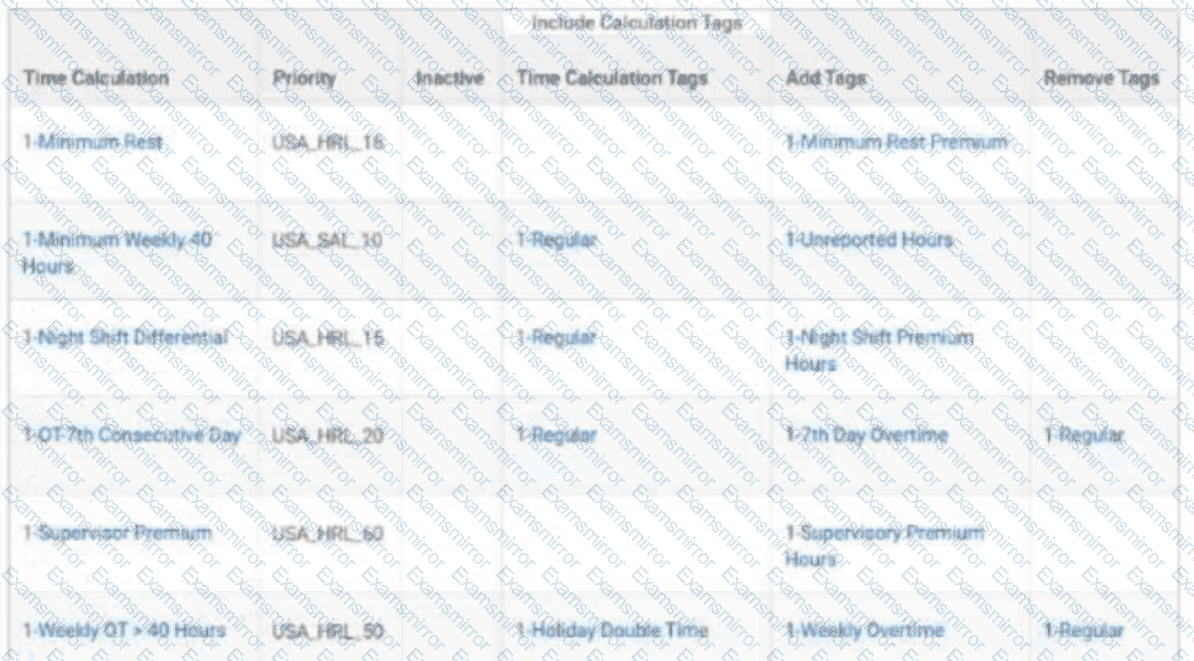
You must create a new time calculation to determine when workers work more than 20 hours in one week with the 1-Supervisor Premium tag.
What is the appropriate priority for the new calculation?
A worker’s Work Schedule Calendar has a Day Breaker of 2:00 AM (current day from previous day). They report regular hours from 8:00 PM, April 05 to 4:00 AM, April 06.
How will the calculated hours show on the time block?
An organization wants to ensure that 12:00 AM is the start time for each day.
What function should they use?
Refer to the following scenario to answer the question below.
You are reviewing time for a worker in California. The worker has reported hours for the seventh consecutive day and the hours are calculating as configured. This week the worker reported 11 hours on the seventh consecutive day worked. This worker is eligible for double-time on all hours worked over 8 on the seventh consecutive day; however, all 11 hours are tagged as seventh consecutive day hours.
You have created and assigned the Seventh Consecutive Day Double Time time calculation to a time calculation group.
Where on the Seventh Consecutive Day Double Time calculation do you find the hours that count toward seventh consecutive day double time?
Refer to the following scenario to answer the question below.
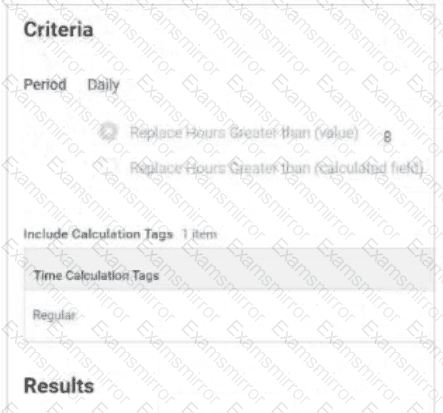

Table is labeled Include Calculation Tags 1 Item
The Time Calculation Tag included is Regular.
Results:
Add Tags field includes Daily Overtime.
Remove Tags field is empty.
Time Day Based On field selection is Calculated Date
The Daily Overtime calculation is tagging hours with both the Regular and Daily Overtime tags. This calculation should only tag hours with the Daily Overtime tag.
What should you edit in the calculation?
On what Time Tracking component can you enable Optional Out Times for a group of workers?
You need to count all hours in a week of system-generated time blocks for breaks.
What business object will you use?
Which report should you run to ensure a worker only has one period schedule?

TOP CODES
Top selling exam codes in the certification world, popular, in demand and updated to help you pass on the first try.