Month End Sale Special Limited Time 75% Discount Offer - Ends in 0d 00h 00m 00s - Coupon code = drift75

Pass the Microsoft GitHub Administrator GH-600 Questions and answers with ExamsMirror

Practice at least 50% of the questions to maximize your chances of passing.
Exam GH-600 Premium Access

View all detail and faqs for the GH-600 exam


0 Students Passed

0% Average Score

0% Same Questions
Viewing page 1 out of 2 pages
Viewing questions 1-10 out of questions
Questions # 1:

You need to provide access to the API key of MCP1. The solution must meet the security requirements.

What should you do?

Options:

A.

Store the API key as a secret in the Copilot environment of product-api by using a name prefix of COPILOT_MCP_, and then reference the variable name in the mcp.json configuration.

B.

In the product-api repository settings, add the API key directly to the .mcp/server.json file by using a plaintext apiKey field.

C.

Store the API key as a GitHub Codespaces user secret scoped to product-api.

D.

In product-api, add the API key as a GitHub Actions encrypted secret and reference the secret by using ${{ secrets.KEY }} in the workflow YAML of agent1.

Questions # 2:

You need to resolve the scoping issue associated to agent1.

What should you do?

Options:

A.

To the profile of agent1, add a custom instruction specifying that the agent must NOT access billing-service or infra-terraform.

B.

Add a permissions block to the agent1 workflow in product-api.

C.

Create a fine-grained personal access token (PAT) scoped to product-api and store the PAT as a GitHub Actions secret for agent1 to use.

D.

Create a ruleset for billing-service and infra-terraform that blocks push access from the github-actions bot account.

Questions # 3:

You need to configure agent1 to support the planned changes.

What should you do?

Options:

A.

Add Use all available tools to the instructions in the agent configuration.

B.

Add the mcp-servers property to the agent configuration.

C.

In the agent configuration, replace line 05 with the following: tools: []

D.

Add Use all available tools to the .github/copilot-instructions.md file.

E.

Delete line 05 from the agent configuration.

Questions # 4:

You need to resolve the issue of the agents generating conflicting output. The solution must meet the implementation guidelines.

What should you do?

Options:

A.

Configure each agent to work on a separate branch and add a required status check that detects file-level overlap before either pull request can be merged.

B.

Configure tools: [ ' read ' , ' search ' ] in both agent profiles to prevent either agent from writing files.

C.

Add shared/config.yaml to a CODEOWNERS file that requires SG_Review approval before any changes can be merged.

D.

Configure a concurrency group on both agent workflows so that only one workflow runs at a time.

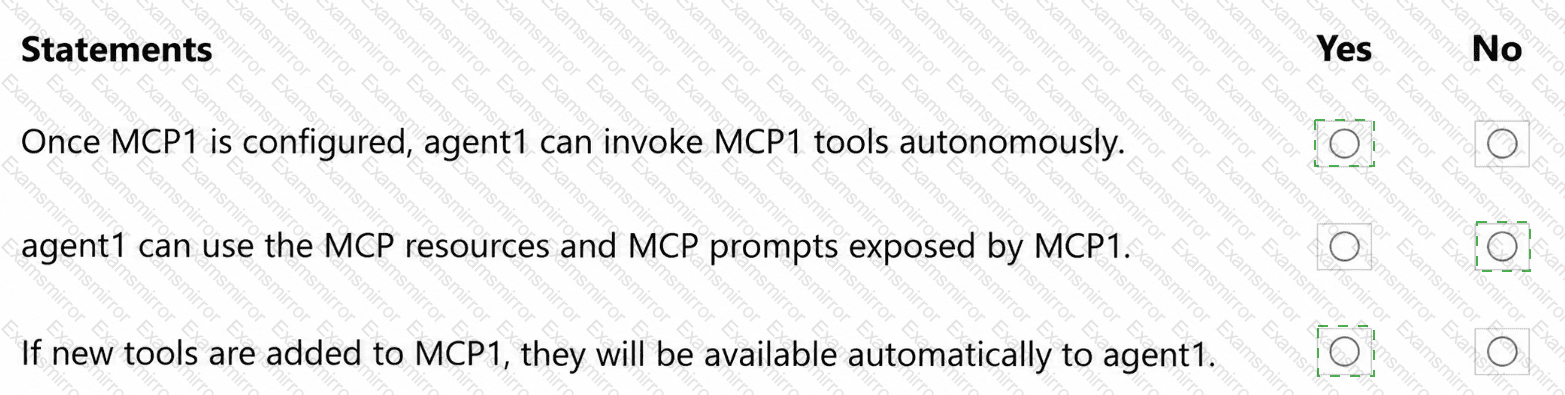
Questions # 5:

You are evaluating how agent1 will behave after you implement the planned changes.

For each of the following statements, select Yes if the statement is true. Otherwise, select No.

NOTE: Each correct selection is worth one point.
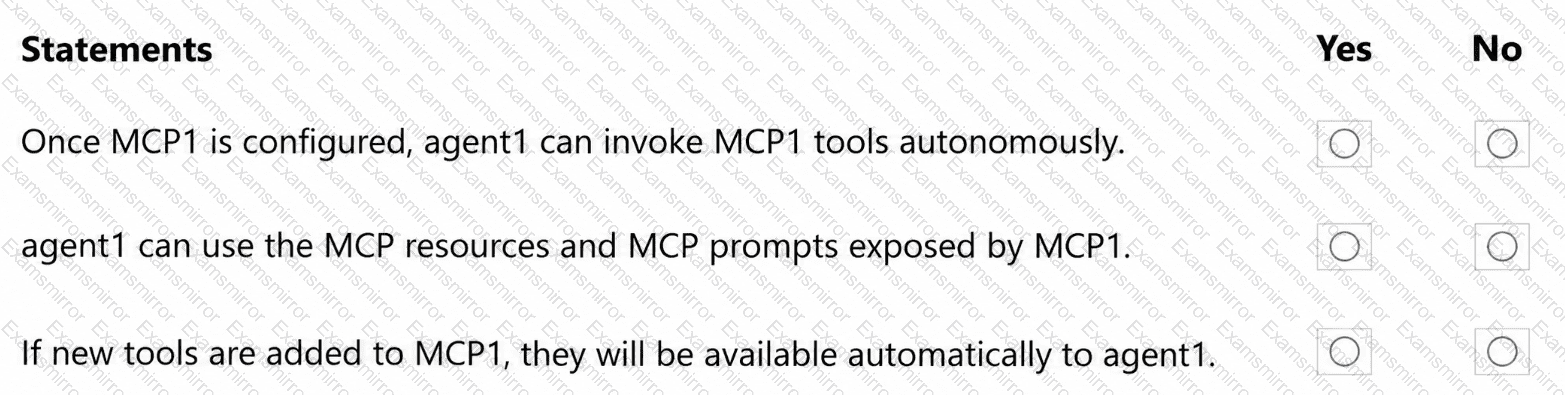
Question # 5

Options:

Questions # 6:

You have a private GitHub repository that has Copilot memory enabled.

Several developers who have write access to the repository make changes across multiple branches, including creating some pull requests that are later closed without merging.

Your team needs to understand how GitHub Copilot ensures that only task-relevant, up-to-date information influences code suggestions, even when older memories exist.

How does Copilot manage memories?

Options:

A.

Copilot stores memories indefinitely until a repository administrator deletes them manually.

B.

Copilot automatically blocks memory creation from pull requests that are closed without merging, to prevent outdated information from being stored.

C.

Copilot stores memories per user, ensuring that only the developer who created a memory can trigger the memory in future sessions.

D.

Copilot validates each memory’s citations against the current branch before using the memory, and ignores the memory if the referenced code no longer exists.

Questions # 7:

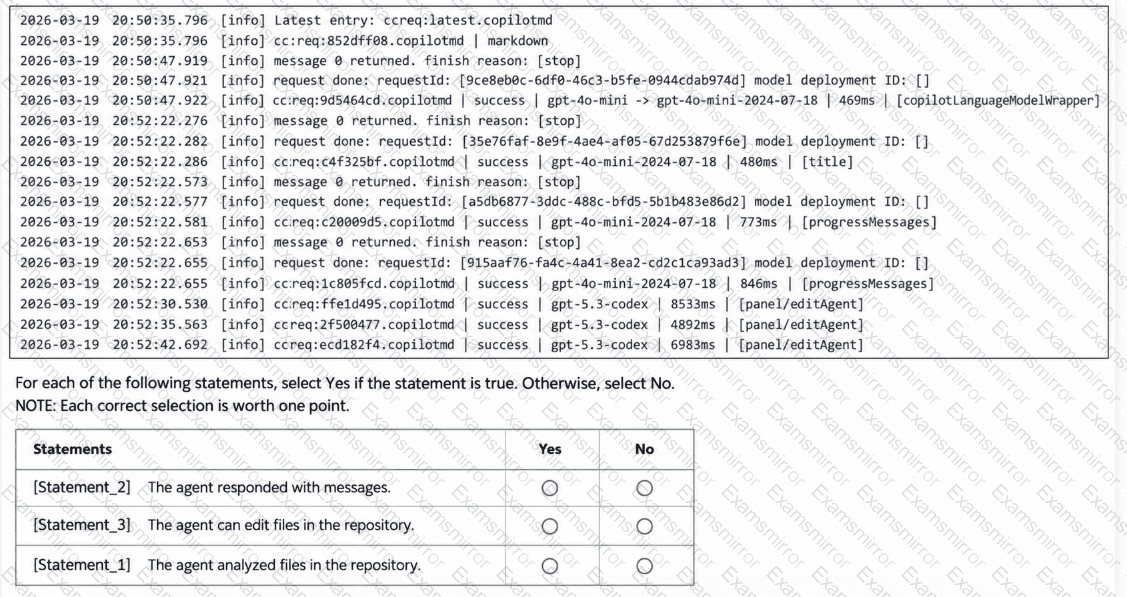
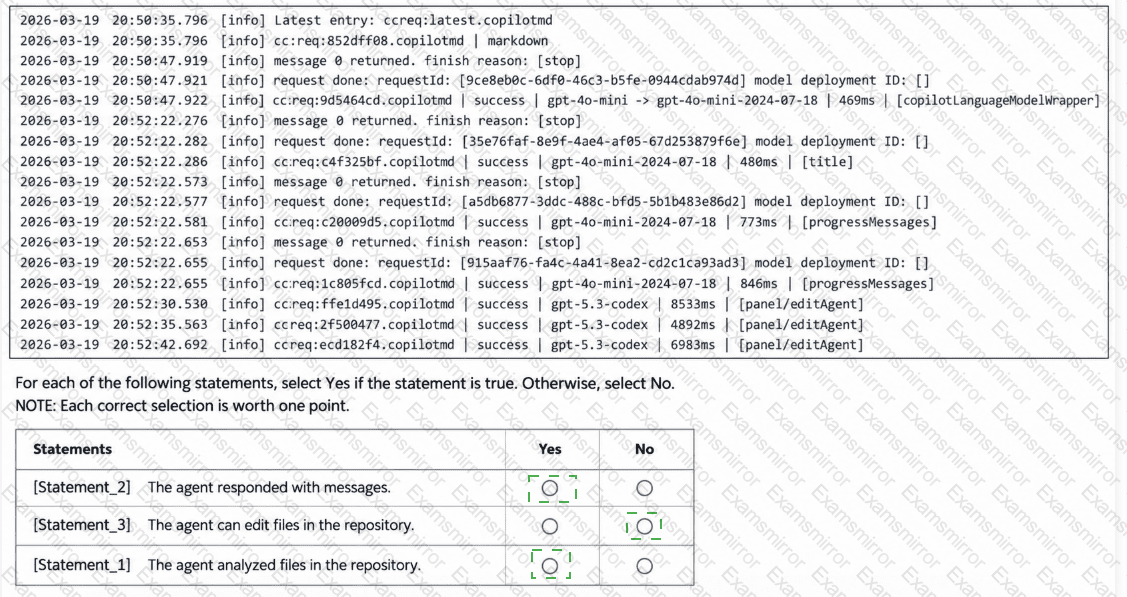
You have the following agent logs.

Question # 7

Options:

Questions # 8:

A team assigns an issue to the GitHub Copilot coding agent by using the following one-line description: Fix the login bug.

Copilot creates a pull request, but the pull request is missing changes and has an incorrect scope.

How should you resolve the issue?

Options:

A.

Add a clear description of the problem to the issue.

B.

Enable Copilot memory.

C.

Update the Model Context Protocol (MCP) server rate limits.

D.

Allocate more resources to copilot-setup-steps.yml.

Questions # 9:

You have a multi-agent GitHub Actions workflow that uploads review artifacts for each run.

You discover that some workflow run artifacts are being deleted manually.

You need to use your organization’s audit log data to identify which user deleted the artifacts.

Which audit log search filter should you use?

Options:

A.

repo: < org > / < repo >

B.

action:workflows.run

C.

action:artifact.destroy

D.

operation:remove

Questions # 10:

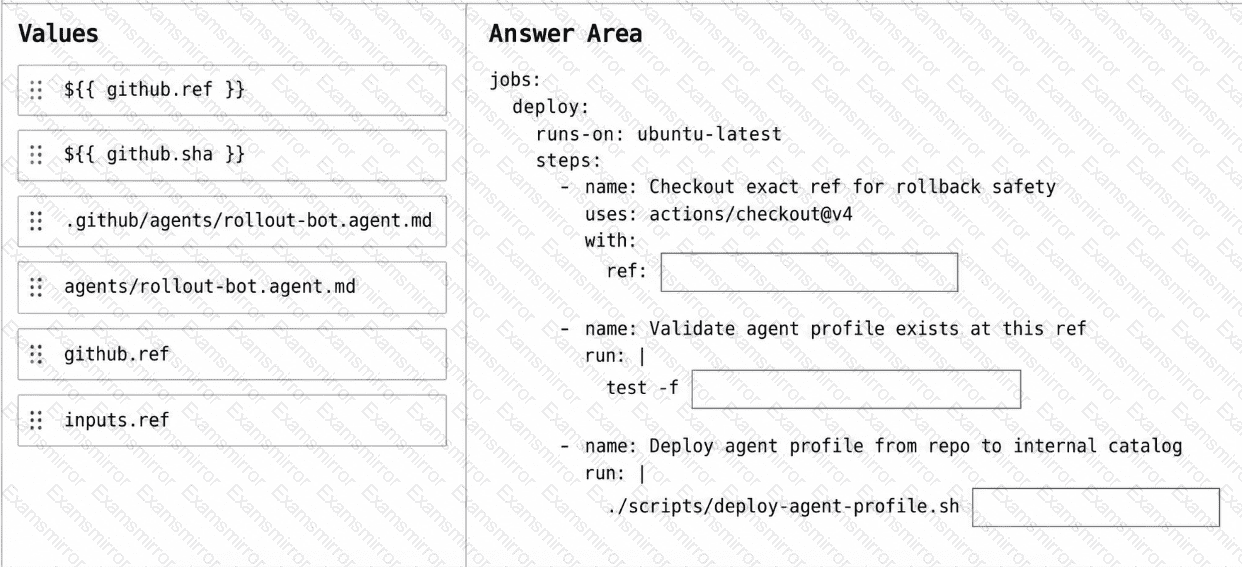
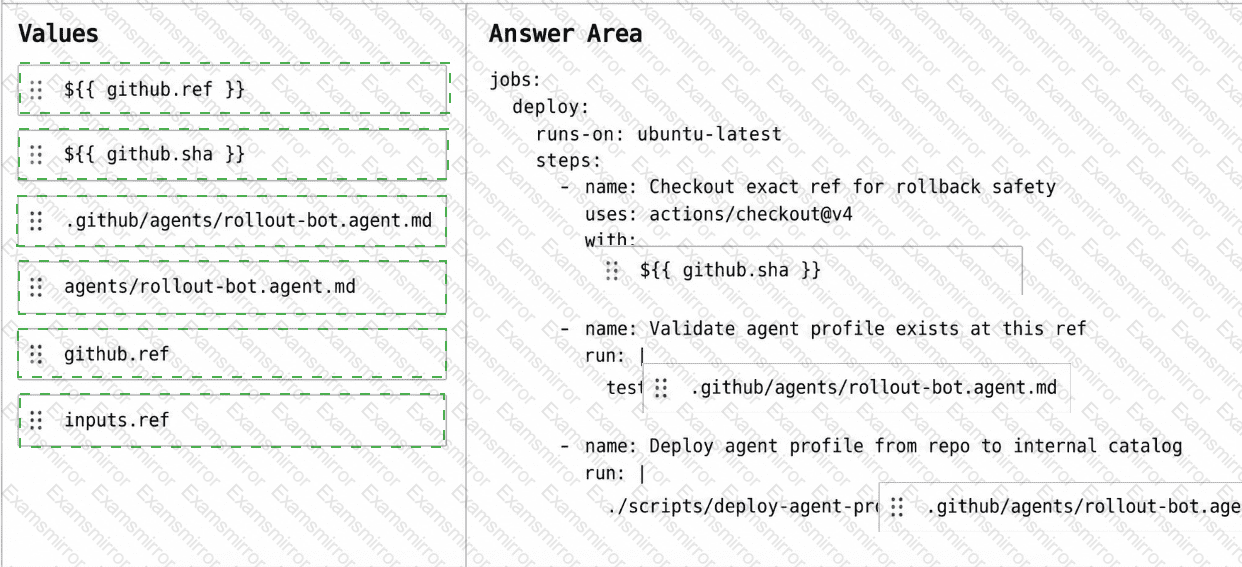
You have a GitHub repository that uses a custom GitHub Copilot coding agent defined in the rollout-bot.agent.md file.

You need to update a workflow so that agent-profile changes can be rolled back by reverting a single commit and rerunning the workflow. The workflow must check out the exact commit being deployed and apply the agent profile from the repository at that commit.

How should you complete the workflow? To answer, drag the appropriate values to the correct targets. Each value may be used once, more than once, or not at all. You may need to drag the split bar between panes or scroll to view content.

NOTE: Each correct selection is worth one point.
Question # 10

Options:

Viewing page 1 out of 2 pages
Viewing questions 1-10 out of questions
TOP CODES

TOP CODES

Top selling exam codes in the certification world, popular, in demand and updated to help you pass on the first try.