Pre-Summer Special Limited Time 70% Discount Offer - Ends in 0d 00h 00m 00s - Coupon code = getmirror

Pass the Oracle CPQ Cloud 1z0-1033-24 Questions and answers with ExamsMirror

Practice at least 50% of the questions to maximize your chances of passing.
Exam 1z0-1033-24 Premium Access

View all detail and faqs for the 1z0-1033-24 exam


755 Students Passed

96% Average Score

95% Same Questions
Viewing page 2 out of 4 pages
Viewing questions 11-20 out of questions
Questions # 11:

When Oracle CX Commerceself-service usersaccess an Oracle CPQ Configurator asguest users, how is the CPQ UI presented to the users?

Options:

A.

Via anew browser windowwhere the user is presented with theCPQ Configurator page

B.

Via anew browser windowwhere the user is presented with theCPQ login page

C.

Via aniFramethat displays withinOracle CPQ

D.

Via aniFramethat displays withinOracle CX Commerce

Questions # 12:

The user would like to run the “SFDC Quote Upsert” on a commerce action. Where would the user define this within CPQ?

Options:

A.

The user will define the action to run in the SOAP Generator XSL.

B.

The user will select the “SFDC Quote Upsert” from the Integration list in the Integration tab on the commerce action.

C.

The user will select the “SFDC Quote Upsert” from the Modify tab in the commerce action.

D.

The user will define the relation in the Integration Center under the Integration Platfrom within the Admin Homepage.

Questions # 13:

Which two statements aboutBMQL (BigMachines Query Language)areFALSE?

Options:

A.

BMQL is a SQL-based query language.

B.

BMQL queries can be written to fetch data from Commerce attributes.

C.

BMQL cannot be used to update data tables.

D.

BMQL does not support Aggregate Functions.

Questions # 14:

Consider the following requirements for integration with Salesforce:

    Transaction information needs to be pushed back to Salesforce and synchronized.

    You must be able to synchronize a transaction with up to 1,000 lines back to the Opportunity Product object in Salesforce.

On the basis of these requirements, which three XSL sets should you use to provide the integration? (Choose three.)

Options:

A.

SFDC Opportunity – Import

B.

SFDC Quote – Upset

C.

SFDC Products – Upset All (200, 400, 600, 800, 1000)

D.

SFDC Quote – Process Updates

E.

SFDC Opportunity – Upload

Questions # 15:

How do you modify a specific user’s access (grant access or remove access) to Product Families, Supported Product Families, and Data Table folders?

Options:

A.

For each Product Family or Data table folder affected, click the Modify tab for that item and then select or deselect the check boxes related to the users you want to grant access to or remove access from for this Product Family or Data Table folder.

B.

Click the user’s name on the User Administration List page to edit the user, click the Access Permission tab, select or deselect the check boxes related to the items you want to grant access to or remove access from for this user.

C.

Click the Group name on the Group Administration List page that has this user as a member, click the Access Permissions tab, select or deselect the check boxes related to the items you want to grant access to or remove access from for this user.

D.

Go to the Product Family definition or the Data Table folder properties for which you want to grant or remove access, click the Access Permissions tab, select or deselect the check boxes related to the users you want to grant access to or remove access from for this Product Family or Data Table folder.

E.

Use the Navigation Menus item on the Administration home page to grant or remove access to specific Product Families or Data Table folders for the user.

Questions # 16:

You are viewing theData pagewhile creating a newPrice Guidance Analytic.

What is the correct procedure for implementing anadvanced filterthat will only consider"Won" quotes?

Options:

A.

Set the toggle to"Yes"forAdditional Data Filters, click the+ iconto create a new filter row, select the"Transaction: Win/Loss Status"data column value for theQuery attribute, select the = operator, select"[Use Specified Value]"for theTransaction attribute, and select"Won"for the specified value.

B.

Click the+ iconto create a new filter row, select the"Transaction: Win/Loss Status"data column value for theQuery attribute, select the <> operator, and select the"Transaction: Win/Loss Status"data column for theTransaction attribute.

C.

Click theiconto create a new filter row, select the"Transaction: Win/Loss Status"data column value for theQuery attribute, select the - operator, and select the"Transaction: Win/Loss Status"data column for theTransaction attribute.

D.

Set the toggle to"Yes"forAdditional Data Filters, click the+ iconto create a new filter row, select the"Transaction: Win/Loss Status"data column value for theQuery attribute, select the"is empty"operator, select"[Use Specified Value]"for theTransaction attribute, and select"Won"for the specified value.

E.

Navigate to theOutput pageof the wizard, click theiconto create a new output row, select the"Transaction: Win/Loss Status"data column value for theOutput attribute, select theAggregate Type "Percentile", and select the"Transaction: Win/Loss Status"data column forSource Column.

Questions # 17:

A use case requires displaying 250 rows of data to a user and allowing the user to interact with the data in a mobile interface.

What is the Oracle-recommended method for displaying an interactive 250-row data set in a Configurator?

Options:

A.

Split the data into two array sets and use logic to show the relevant set of data.

B.

Use an HTML attribute to display the data and use JavaScript to create interactivity.

C.

Use an array set to show this data.

D.

You do not have a good option because 250 rows are too much to display on the screen of a Configurator.

Questions # 18:

Which statement is a proper definition of a Punch-In?

Options:

A.

Punch-Ins are links that hook into a specific Commerce process in the system. They can be used to navigate directly to a given Commerce process in your application. They can also be used to jump into a specific Commerce process from an external website.

B.

Punch-Ins are links that hook into specific product families in the system. They can be used to navigate directly from a product family to another in your application. They can also be used to jump into a specific product family from an external website.

C.

Punch-Ins are links that relate into specific parts in the system. They can be used to search directly for a given part in your application. They can also be used to search for a specific part from an external website.

D.

Punch-Ins are links that hook into specific pages in the system. They can be used to navigate directly from one page to another in your application. They can also be used to jump to a specific page from an external website.

E.

Punch-Ins are buttons that take you to specific pages in the system. They can be used to navigate directly from one page to another in your application.

Questions # 19:

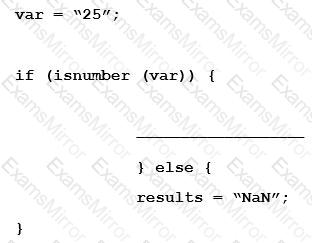
Given the following code:

Question # 19

Which statement will return the value for results as 25.0 when it is put in place of the blank line shown above the “}else{” statement?

Options:

A.

results = atoi (var);

B.

results = atof (var);

C.

results = stringtointeger (var);

D.

results = stringtofloat (var);

Questions # 20:

Which statement is FALSE about live data tables?

Options:

A.

Live data tables do not need to be deployed after modification.

B.

Web services are recommended to update live data tables over BMQL functions.

C.

Insert, Modify, Delete, and Update are supported BMQL functions for live data tables.

D.

Live data tables can be modified using UI, Web Services, BMQL, and Bulk Uploads.

Viewing page 2 out of 4 pages
Viewing questions 11-20 out of questions
TOP CODES

TOP CODES

Top selling exam codes in the certification world, popular, in demand and updated to help you pass on the first try.