
Pre-Summer Special Limited Time 70% Discount Offer - Ends in 0d 00h 00m 00s - Coupon code = getmirror

Pass the UiPath Certified Professional - Developer Track UiPath-ADAv1 Questions and answers with ExamsMirror

Practice at least 50% of the questions to maximize your chances of passing.
Exam UiPath-ADAv1 Premium Access

View all detail and faqs for the UiPath-ADAv1 exam


781 Students Passed

96% Average Score

91% Same Questions
Viewing page 6 out of 10 pages
Viewing questions 51-60 out of questions
Questions # 51:

What is the purpose of Breakpoints when debugging a project in UiPath Studio?

Options:

A.

To purposely pause the debugging process on an activity which may trigger execution issues.

B.

To automatically restart the debugging process when an error is encountered.

C.

To measure the execution time of each activity in the workflow.

D.

To export debugging results in different formats.

Questions # 52:

When should the Show Elements button be used in the Computer Vision wizard?

Options:

A.

Highlighting all Ul elements that have been identified by the Computer Vision analysis.

B.

Displaying a list of all available UI elements and their properties.

C.

Activating a real-time view of the target app's UI during automation.

D.

Filtering out specific UI elements from being processed by the Computer Vision engine.

Questions # 53:

What happens when the area selection feature in the UiPath Computer Vision wizard is used?

Options:

A.

The selected area is automatically resized to fit all UI elements within it.

B.

A portion of the application Ul can be selected, which is helpful when dealing with multiple fields bearing the same label.

C.

The selected area is treated as a single UI element, with no further analysis of its contents.

D.

A duplicated Ul can be selected, and the copy is modified in the automation process.

Questions # 54:

What happens when closing a Remote Debugging Connection while a debugging execution is in progress?

Options:

A.

Debugging execution stops gracefully, then the connection is closed.

B.

The remote robot continues the execution after Studio closes the connection.

C.

It is not possible to close the connection while debugging is in progress.

D.

Debugging execution ends in exception, then the connection is closed.

Questions # 55:

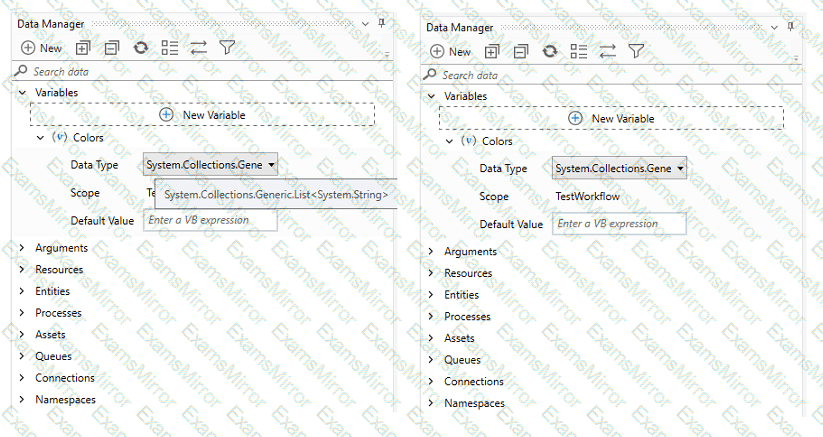
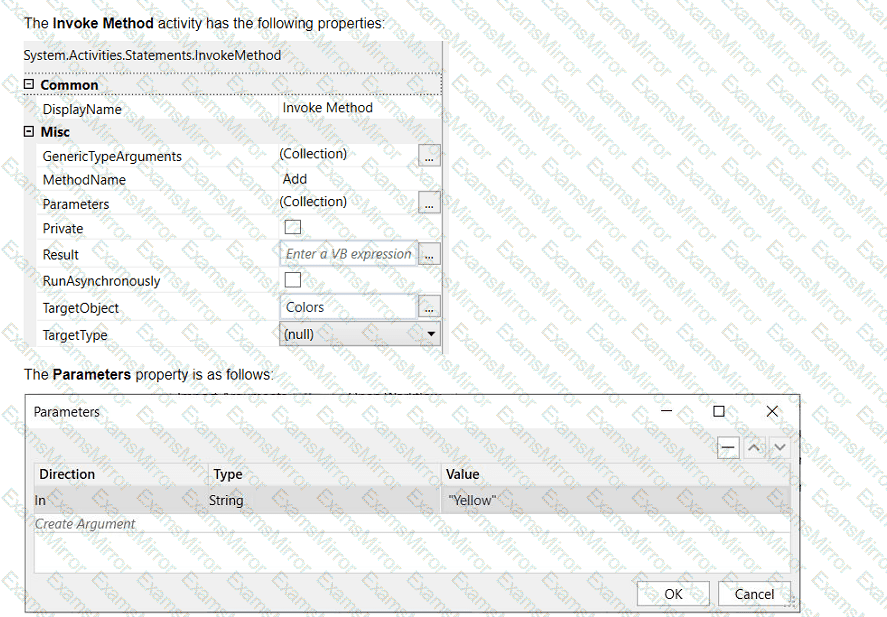
A developer wants to add items to a list of strings using the Invoke Method activity. The list is declared as follows:
Question # 55

Question # 55

Based on the information shown in the exhibits, what is the outcome of the Invoke Method activity?

Options:

A.

Colors will contain an item with the value "Colors: Yellow".

B.

Colors will contain an item with an empty value.

C.

Colors will contain an item with the value "Yellow".

D.

An exception will be thrown.

Questions # 56:

Which of the following workflow names is correct, based on best practices?

Options:

A.

Transactionstatus

B.

Workflow1

C.

creation_of_file

D.

ScrapeFilteredStocks

Questions # 57:

Which of the following describes the correct hierarchy of the elements in the Object Repository tree structure?

Options:

A.

Screen, Application, Version, UI Element.

B.

Application, Version, Screen, UI Element.

C.

Application, Screen, UI Element, Version.

D.

Version, Application, Screen, UI Element.

Questions # 58:

Which activity is used to archive a set of files and send them as an attachment in an email?

Options:

A.

Create Folder

B.

Archive Files

C.

Compress/Zip Files

D.

Create File

Questions # 59:

You want to identify a selector in a Type into activity that will be used for a text input field within an application. In order for the Type into activity to execute as expected, how many elements in an application can a selector be valid for at runtime?

Options:

A.

1 element

B.

2 elements

C.

3 elements

D.

5 elements

Questions # 60:

What is the most efficient way to implement the behavior of monitoring an Outlook 365 email account and executing automation steps when a certain email is received?

Options:

A.

Create a robot that periodically opens Outlook UI, scrapes received email information, opens and extracts data from matching criteria emails, initiates a new job, and continues email monitoring.

B.

Use the Office365 Email Monitoring Trigger and configure the filters.

C.

Use the Office365 Email Received Trigger and configure the filters.

D.

Create a robot that once every few minutes reads the emails from the account and if one matching the search criteria appears, it starts executing the automation steps.

Viewing page 6 out of 10 pages
Viewing questions 51-60 out of questions
TOP CODES

TOP CODES

Top selling exam codes in the certification world, popular, in demand and updated to help you pass on the first try.