
Halloween Sale Special Limited Time 75% Discount Offer - Ends in 0d 00h 00m 00s - Coupon code = drift75
Pass the Microsoft 365 Certified: Endpoint Administrator Associate MD-102 Questions and answers with ExamsMirror
Exam MD-102 Premium Access
View all detail and faqs for the MD-102 exam
850 Students Passed
97% Average Score
96% Same Questions
You need to meet the technical requirements for the new HR department computers.
How should you configure the provisioning package? To answer, select the appropriate options in the answer area.
NOTE: Each correct selection is worth one point.


What is the maximum number of devices that User1 and User2 can enroll in Intune? To answer, select the appropriate options in the answer area.
NOTE: Each correct selection is worth one point.


You need to meet the technical requirements for the LEG department computers.
Which three actions should you perform in sequence? To answer, move the appropriate actions from the list of actions to the answer area and arrange them in the correct order.


You need to prepare for the deployment of the Phoenix office computers.
What should you do first?
You need to meet the requirements for the MKG department users.
What should you do?
You need to prepare for the deployment of the Phoenix office computers.
What should you do first?
Your network contains an on-premises Active Directory domain that contains the locations shown in the following table.

In Microsoft Intune, you enroll the Windows 10 devices shown in the following table.
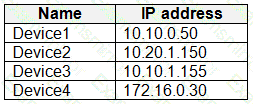
You have a Delivery Optimization device configuration profile applied to all the devices. The profile is configured as shown in the following exhibit.
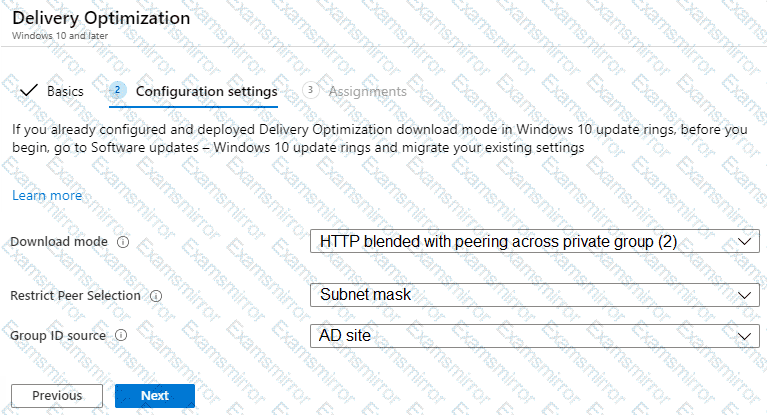
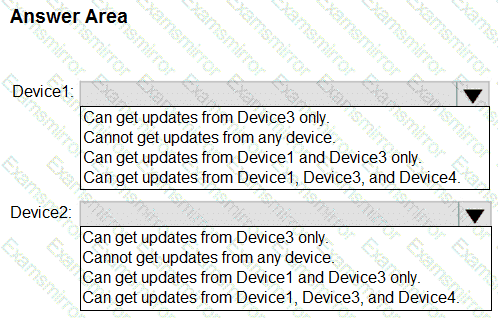
From which devices can Device1 and Device2 get updates? To answer, select the appropriate options in the answer area.
NOTE: Each correct selection is worth one point.

You have a Microsoft 365 subscription that uses Microsoft Intune Suite.
You use Microsoft Intune to manage Windows 11 devices.
You create a new policy set named Set and add five device configuration profiles for Windows 10 and later.
You create a device compliance policy named Policy1.
You need to ensure that when users are assigned the device configuration profiles in Set1, they are always assigned Policy1 also.
What should you configure?
You have a Microsoft 365 subscription. The subscription contains 500 computers that run Windows 11 and are enrolled in Microsoft Intune. You need to manage the deployment of monthly security updates. The solution must meet the following requirements:
• Updates must be deployed to a group of test computers for quality assurance.
• Updates must be deployed automatically 15 days after the quality assurance testing.
What should you create in the Microsoft Intune admin center?
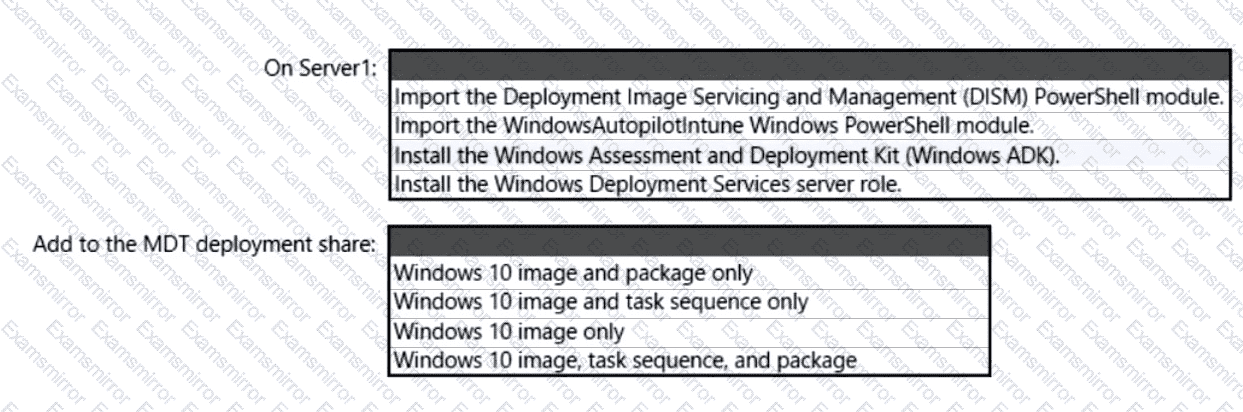
You have a server named Server1 and computers that run Windows 8.1. Server1 has the Microsoft Deployment Toolkit (MDT) installed.
You plan to upgrade the Windows 8.1 computers to Windows 10 by using the MDT deployment wizard.
You need to create a deployment share on Server1.
What should you do on Server1, and what are the minimum components you should add to the MDT deployment share? To answer, select the appropriate options in the answer area.
NOTE: Each correct selection is worth one point.


TOP CODES
Top selling exam codes in the certification world, popular, in demand and updated to help you pass on the first try.