
Halloween Sale Special Limited Time 75% Discount Offer - Ends in 0d 00h 00m 00s - Coupon code = drift75
Pass the Microsoft 365 Certified: Endpoint Administrator Associate MD-102 Questions and answers with ExamsMirror
Exam MD-102 Premium Access
View all detail and faqs for the MD-102 exam
850 Students Passed
97% Average Score
96% Same Questions
You have a Microsoft 365 subscription and use Microsoft Intune.
You have the Endpoint Privilege Management (EPM) elevation settings policy shown in the following exhibit.
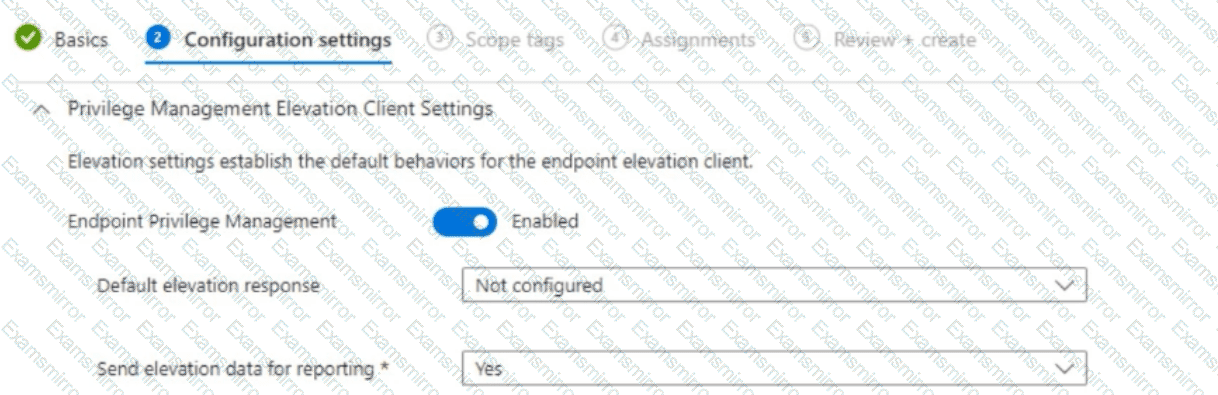
No EPM elevation rules policies are configured.
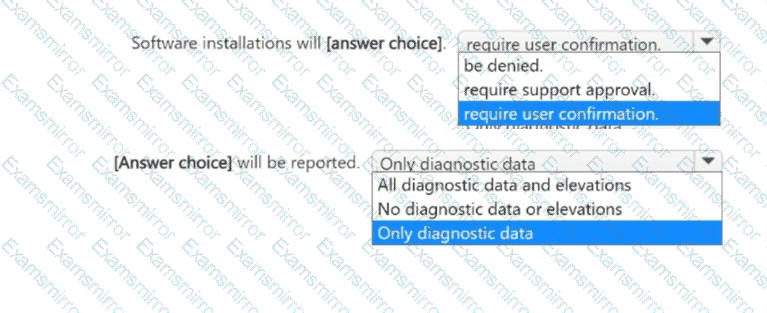
Use the drop-down menus to select the answer choice that completes each statement based on the information presented in the graphic.
NOTE: Each correct selection is worth one point.

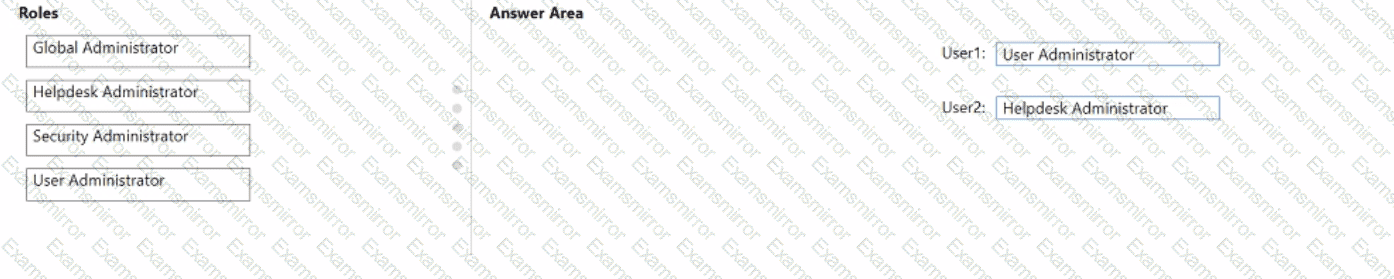
You have a Microsoft 365 subscription that contains two users named User1 and User2. You need to ensure that the users can perform the following tasks:
• User1 must be able to create groups and manage users.
• User2 must be able to reset passwords for no administrative users.
The solution must use the principle of least privilege.
Which role should you assign to each user? To answer, drag the appropriate roles to the correct users. Each role may be used once, more than once, or not at all. You may need to drag the split bar between panes or scroll to view content.
NOTE: Each correct selection is worth one point.


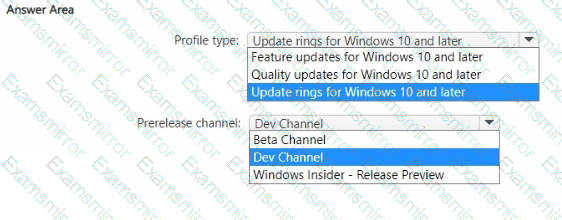
You have a Microsoft 365 E5 subscription. All devices are enrolled in Microsoft Intune.
You have a device group named Group1 that contains five Windows 11 devices.
You need to ensure that the devices in Group1 automatically receive new Windows 11 builds before the builds are released to the public.
What should you configure in Intune? To answer, select the appropriate options in the answer area.
NOTE: Each correct selection is worth one point.

Your company has an Azure AD tenant named contoso.com that contains several Windows 10 devices.
When you join new Windows 10 devices to contoso.com, users are prompted to set up a four-digit pin.
You need to ensure that the users are prompted to set up a six-digit pin when they join the Windows 10 devices to contoso.com.
Solution: From the Microsoft Entra admin center, you configure automatic mobile device management (MDM) enrollment. From the Microsoft Intune admin center, you configure the Windows Hello for Business enrollment options.
Does this meet the goal?
You have a Microsoft 365 subscription.
You plan to enroll devices in Microsoft Endpoint Manager that have the platforms and versions shown in the following table.
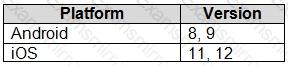
You need to configure device enrollment to meet the following requirements:
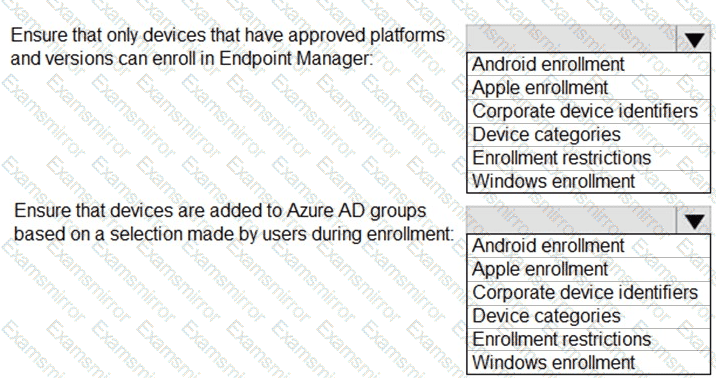
Ensure that only devices that have approved platforms and versions can enroll in Endpoint Manager.
Ensure that devices are added to Microsoft Azure Active Directory (Azure AD) groups based on a selection made by users during the enrollment.
Which device enrollment setting should you configure for each requirement? To answer, select the appropriate options in the answer area.
NOTE: Each correct selection is worth one point.

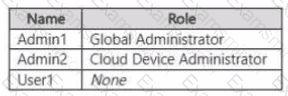
You have a Microsoft Entra tenant named contoso.com that contains the users shown in the following table.
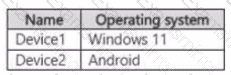
You purchase the devices shown in the following table.
Administrators perform the following actions:
• Join Device1 to contoso.com by using the credentials of Admin1.
• Register Device2 in contoso.com by using the credentials of Admin2.
For each of the following statements, select Yes if the statement is true. Otherwise, select No.
NOTE: Each correct selection is worth one point.


You have a Hyper-V host. The host contains virtual machines that run Windows 10 as shown in following table.
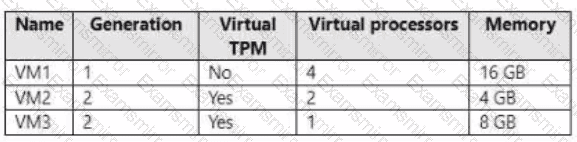
Which virtual machines can be upgraded to Windows 11?
You have 200 computers that run Windows 10. The computers are joined to Azure AD and enrolled in Microsoft Intune. You need to set a custom image as the wallpaper and sign-in screen.
Which two settings should you configure in the Device restrictions configuration profile? To answer, select the appropriate settings in the answer area.
NOTE: Each correct selection is worth one point.
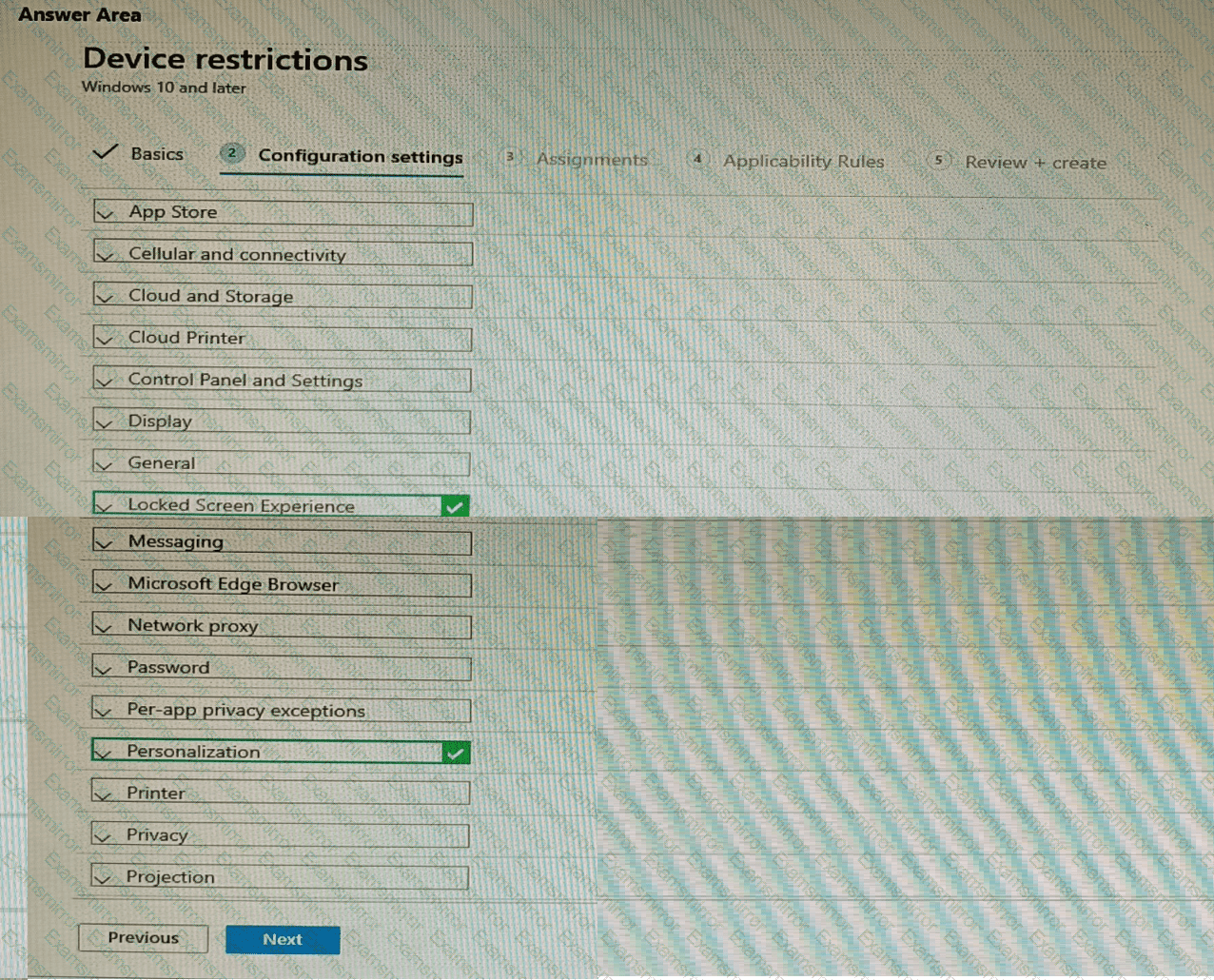

Your network contains an on-premises Active Directory Domain Services {AD DS) domain that syncs with an Azure AD tenant by using Azure AD Connect.
You use Microsoft Intune and Configuration Manager to manage devices.
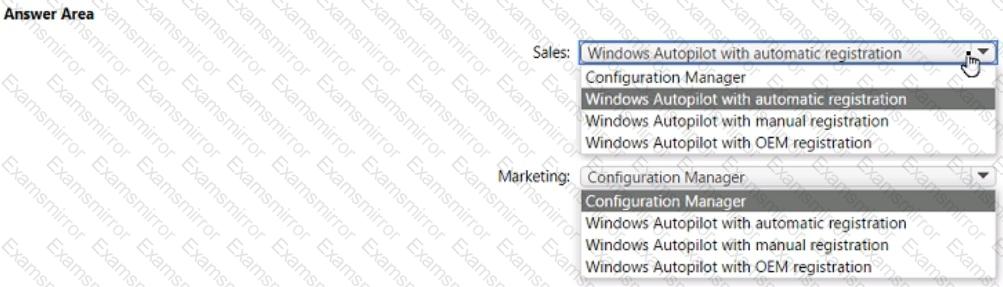
You need to recommend a deployment plan for new Windows 11 devices. The solution must meet the following requirements:
• Devices for the marketing department must be joined to the AD DS domain only. The IT department will install complex applications on the devices at build time, before giving the devices to the marketing department users.
• Devices for The sales department must be Azure AD joined. The devices will be shipped directly from the manufacturer to The homes of the sales department users.
• Administrative effort must be minimized.
Which deployment method should you recommend for each department? To answer, select the appropriate options in the answer area. NOTE: Each correct selection is worth one point.

You have a Microsoft 365 subscription and use Microsoft Intune Suite.
The subscription contains devices enrolled in Intune as shown in the following table.
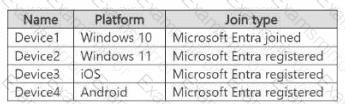
Which devices support Device query?

TOP CODES
Top selling exam codes in the certification world, popular, in demand and updated to help you pass on the first try.