
Halloween Sale Special Limited Time 75% Discount Offer - Ends in 0d 00h 00m 00s - Coupon code = drift75
Pass the Microsoft 365 Certified: Endpoint Administrator Associate MD-102 Questions and answers with ExamsMirror
Exam MD-102 Premium Access
View all detail and faqs for the MD-102 exam
850 Students Passed
97% Average Score
96% Same Questions
You have groups that use the Dynamic Device membership type as shown in the following table.

You are deploying Microsoft 365 apps.
You have devices enrolled in Microsoft Intune as shown in the following table.

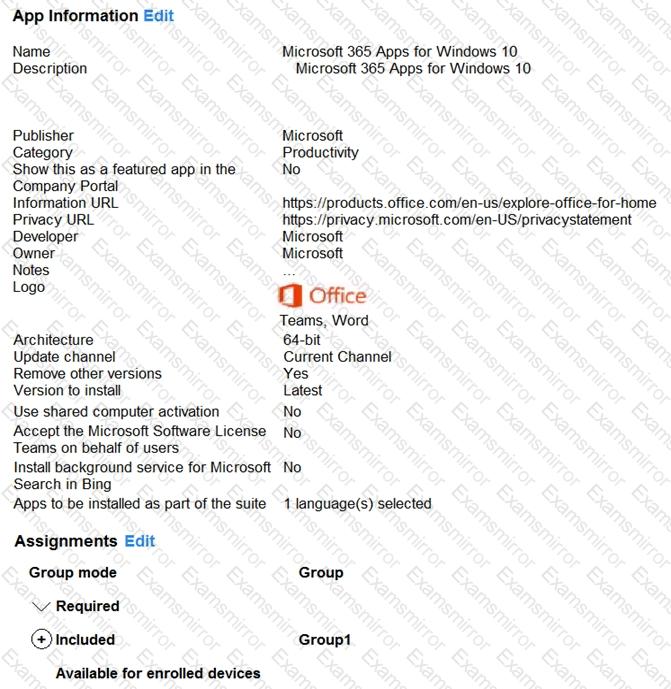
In the Microsoft Endpoint Manager admin center, you create a Microsoft 365 Apps app as shown in the exhibit. (Click the Exhibit tab.)
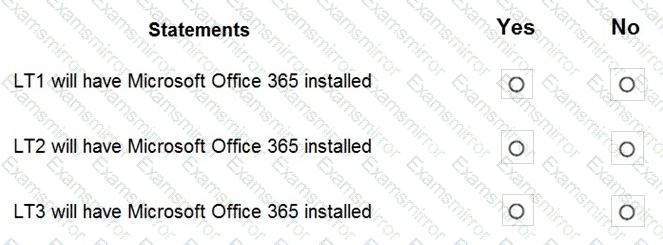
For each of the following statements, select Yes if the statement is true. Otherwise, select No.
NOTE: Each correct selection is worth one point.

You have a Microsoft 365 E5 subscription and use Microsoft Intune.
You need to use a Sync bulk device action on all corporate-owned Windows devices.
What is the maximum number of devices you can include the action?
You use a Microsoft Intune subscription to manage iOS devices.
You configure a device compliance policy that blocks jailbroken iOS devices.
You need to enable Enhanced jailbreak detection.
What should you configure?
You have a Microsoft 365 E5 subscription that uses Microsoft Intune.
You add apps to Intune as shown in the following table.
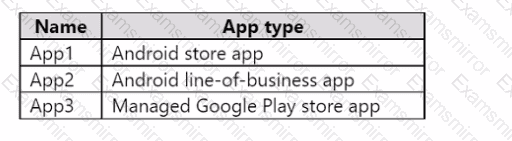
You need to create an app configuration policy named Policy1 for the Android Enterprise platform.
Which apps can you manage by using Policyl1?
Your company has a computer named Computer1 that runs Windows 10.
Computed was used by a user who left the company.
You plan to repurpose Computer1 and assign the computer to a new user.
You need to redeploy Computer1 by using Windows Autopilot.
Which three actions should you perform in sequence? To answer, move the appropriate actions from the list of actions to the answer area and arrange them in the correct order.


You need to implement mobile device management (MDM) for personal devices that run Windows 11. The solution must meet the following requirements:
• Ensure that you can manage the personal devices by using Microsoft Intune.
• Ensure that users can access company data seamlessly from their personal devices.
• Ensure that users can only sign in to their personal devices by using their personal account.
What should you use to add the devices to Azure AD?
You have a Microsoft 365 subscription that includes Microsoft Intune.
You need to implement a Microsoft Defender for Endpoint solution that meets the following requirements:
• Enforces compliance for Defender for Endpoint by using Conditional Access
• Prevents suspicious scripts from running on devices
What should you configure? To answer, drag the appropriate features to the correct requirements. Each feature may be used once, more than once, or not at all. You may need to drag the split bar between panes or scroll to view content.
NOTE: Each correct selection is worth one point.



In Microsoft Intune, you have the device compliance policies shown in the following table.
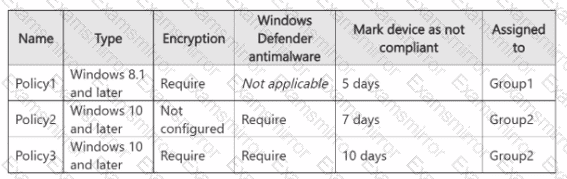
The Intune compliance policy settings are configured as shown in the following exhibit.
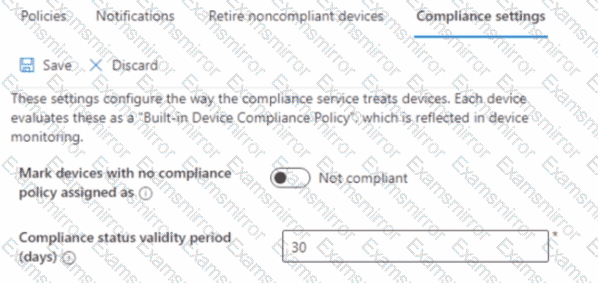
On June 1, you enroll Windows 11 devices in Intune as shown in the following table.

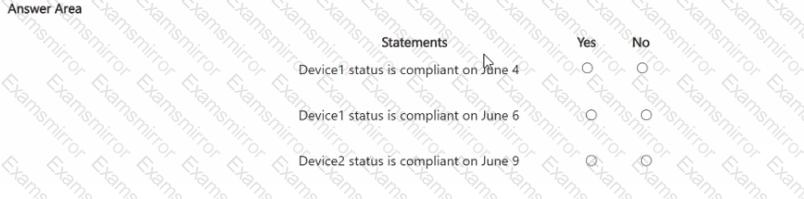
For each of the following statements, select Yes if the statement is true. Otherwise, select No.
NOTE: Each correct selection is worth one point

Your network contains an Active Directory domain. The domain contains a computer named Computer! that runs Windows 11. You need to enable the Windows Remote Management (WinRM) service on Computer1 and perform the following configurations:
• For the WinRM service, set Startup type to Automatic.
• Create a listener that accepts requests from any IP address.
• Enable a firewall exception for WS-Management communications.
Which PowerShell cmdlet should you use?
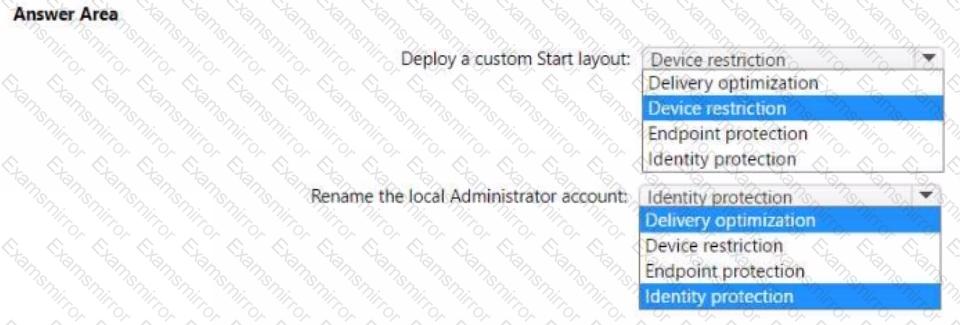
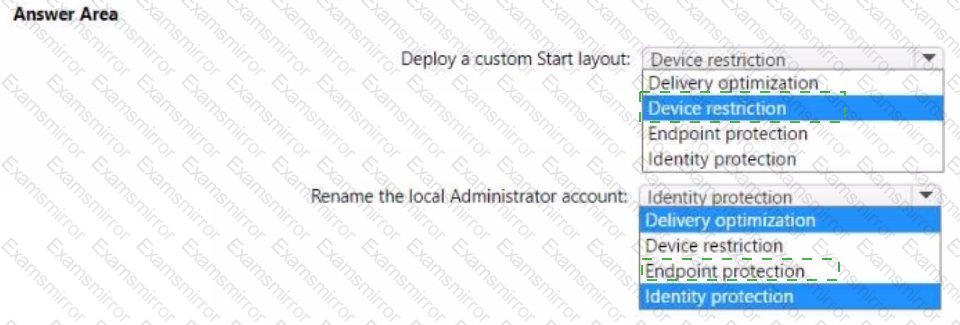
You have a Microsoft 365 subscription that uses Microsoft Intune and contains 100 Windows 10 devices. You need to create Intune configuration profiles to perform the following actions on the devices:
• Deploy a custom Start layout.
• Rename the local Administrator account.
Which profile type template should you use for each action? To answer, select the appropriate options in the answer area. NOTE: Each correct selection is worth one point.

TOP CODES
Top selling exam codes in the certification world, popular, in demand and updated to help you pass on the first try.